Jackery Explorer 300 explained: specs, charging, price
Disclosure: Some links in this guide are affiliate links. If you buy through them we may earn a commission, at no extra cost to you. We only link to products the guide is about. How we make money.
On this page
The short answer
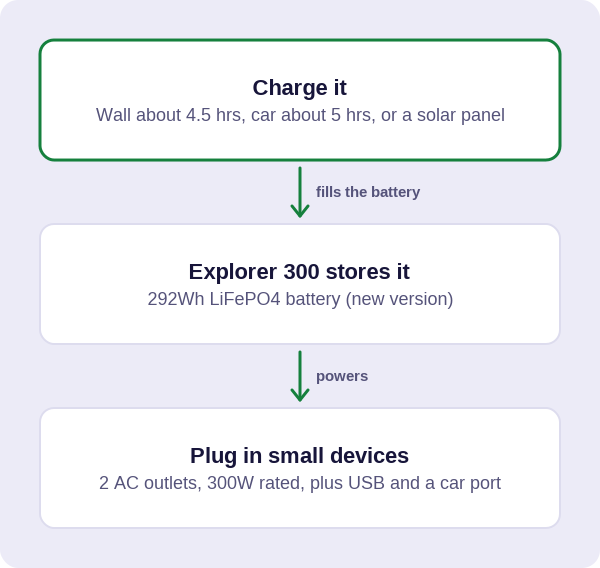
The Jackery Explorer 300 is a small portable power station. Jackery's spec table for the current version lists "292Wh (15.2Ah / 19.2V DC)" of capacity, a "LiFePO4 Battery" and AC output of "120V, 300W (600W peak)". 1 It charges from a wall outlet, a car socket or a solar panel. 1 On 24 November 2026, Jackery's US store showed it at US$289.00. 1 Jackery says its AC outlets only run devices under 300 watts, and it names small gear such as "drones, mini coolers, TVs, portable fans, and lights". 1
What the Explorer 300 is
The Explorer 300 sits at the small end of Jackery's range of portable power stations. 1 It's a battery with household outlets, USB ports and a car port built in. You charge it before a storm, then run phones, lights or a laptop from it while the grid is down. Our plain guide to power stations covers how the category works.
Here's the catch with this model. Jackery sold an older Explorer 300 with a "Lithium-ion Battery (NCM)", according to its basic information page. 2 Its US product page now sells one labelled "Explorer 300 New", with a "LiFePO4 Battery". 1 Capacity, cycle life and the USB-C port all differ between them, so look at your unit's label first.
Other Jackery models carry 300 in the name too. Its menu lists the "Explorer 300 v2" at "288Wh | 300W Output" and the "Explorer 300D" at "288 Wh Capacity | 140W Output". 1 This page covers the plain Explorer 300 only.
Nobody here has used one. The figures below are Jackery's, taken from its pages on 24 November 2026. 1 2
Explorer 300 specs from Jackery's page
These come from the spec table on Jackery's US product page, for the "Explorer 300 New". 1
- Capacity: "292Wh (15.2Ah / 19.2V DC)". Wh, or watt-hours, is how much energy the battery holds. 1 - Battery: "LiFePO4 Battery", rated for "4000 cycles to 70%+ capacity". 1 - AC output: "120V, 300W (600W peak)". Peak is a short burst for starting a motor. 1 - USB-C output: "100W Max". 1 - USB-A output: "15W Max, 5V⎓3A". 1 - Size: "9.06 x 6.02 x 7.83 in". 1 - Warranty: "5 Years". 1
Weight isn't consistent on the page. The spec table says "7.1 Ibs / 3.2 kg" (Jackery's spelling), while the summary at the top says "Just 7.5 lbs". 1 Its longer description gives "291.84Wh", which is the spec table's 15.2Ah × 19.2V worked out exactly. 1 The same description mentions a "60W USB-C PD port", though, which matches the older version's "Max. 60W" rather than the new spec table's 100W. 1 2 We've used the spec table above.
LiFePO4 means lithium iron phosphate. Our guide to lithium iron phosphate batteries explains what the cycle rating means.
How to charge the Jackery Explorer 300
Jackery's product page lists three ways to charge it, with these times: "Solar Charging 5 Hrs", "Wall Charging 4.5 Hrs" and "Car Charging 5 Hrs". 1 The box includes "1* AC & AC Cable (2 Parts)" and "1* Car Charger Cable". 1
Solar panels are sold separately. Jackery says you can "Reach 80% capacity in about 2.8 hours with a compatible 100W solar panel or 7.5 hours with a 40W panel (sold separately)." 1 Further down, the same page says it "can be charged using SolarSaga solar panels within 3.5 hours (0-80%)", without naming the panel. 1 So treat solar times as rough, and check the figure for the panel you'd use.
For a faster top-up, the page says "You can combine the wall outlet and USB-C PD port for faster charging." 1 It doesn't list a USB-C charger in the box, so that needs a charger of your own.
Jackery lists a charging temperature of "32°F to 113°F / 0°C to 45°C". 1 It also says it "can supply power to your device in the temperature range of -10 to 40 degrees Celsius". 1 For how lithium iron phosphate cells like to be charged in general, this LiFePO4 charging guide quotes the makers' rules.
The older version charges differently. Jackery's basic information page lists "Around 4.5H" from the wall and "Around 5H" from a car socket, and it takes a "Max. 1 panel" for solar. 2
How to turn off the Jackery Explorer 300
Jackery's US product page and its basic information page don't give power-off steps for the Explorer 300. So use the user manual for your version. The product page lists "1* User Manual (Explorer 300)" in the box. 1
The basic information page, which covers the older NCM version, does give a reset. "Press and hold the DISPLAY button for 10 seconds until the display briefly shows “8888”, then returns to the normal interface — this confirms a successful reset." 2
Don't open the case or the battery to fix a fault. Contact Jackery support instead.
How long will it run your devices?
Jackery gives its own formula on the product page: "Working time = 293Wh* 0.85 / operating wattage of your device". 1 Its example is a 30W device: "293Wh*0.85/30w=8.3hrs (rough calculated)". 1
Here's the same sum for a 50W load, as our estimate: 293 × 0.85 ÷ 50 = about 5 hours. For a 10W load it's 293 × 0.85 ÷ 10 = about 25 hours. Real results vary, and Jackery says "actual power consumption varies from different usages". 1 Note that Jackery's formula uses 293Wh, while the new version's spec table lists 292Wh. 1
Mind the limit. Jackery's FAQ says "the AC output port can only charge/power devices that operate at less than 300-Watt". It adds: "Once exceeding, the Explorer 300 will shut off automatically." 1 So check the watts on the label of anything you plan to run. For keeping a fridge cold, our refrigerator and freezer sizing page shows the sums for bigger stations, such as Anker's C1000 and C1000 Gen 2.
Using it for home backup
This is a plug-in station. You run devices from its own outlets, one by one. It isn't wired into your home. For how stations like this fit into an outage plan, see our page on power stations for home backup.
Never connect a power station to a wall outlet to push power back into the house. That's called backfeeding. Poudre Valley REA, an electric co-op, warns it's a danger "to the neighboring properties, and to our lineworkers and other first responders". 3 The safe way to feed home circuits is a transfer switch, which works by "safely isolating the power source", and the co-op says it should be "installed by a professional". 3
One handy point for outages: Jackery's basic information page says the older version supports pass-through charging, "Yes, supported." 2 That means it can charge while it powers your devices. The new version's page doesn't say either way.
Price on 24 November 2026
Jackery's US store showed the "Explorer 300 Portable Power Station" at "$289.00" on 24 November 2026, in US dollars. 1 A bundle with a 40W solar panel, listed as "Explorer 300 + SolarSaqa 40W air" (Jackery's spelling), was marked "Sold Out". 1
The warranty is "5 Years", and Jackery says it's "applied automatically when you purchase it from the Official Website". 1 A refurbished Explorer 300 was also on the menu, marked "50% OFF". 1 Prices change often, especially around Black Friday, so check the live page before you buy.
Need more stored energy? Our page on a larger Jackery power station covers a bigger model.
Frequently asked questions
How do I charge a Jackery Explorer 300?
From a wall outlet ("Wall Charging 4.5 Hrs"), a car socket ("Car Charging 5 Hrs") or a solar panel ("Solar Charging 5 Hrs"), says Jackery's product page. 1 It adds that "You can combine the wall outlet and USB-C PD port for faster charging." 1
How do I turn off a Jackery Explorer 300?
Jackery's product and basic information pages don't give power-off steps, so follow the user manual for your version. For the older version, the basic information page gives a reset: hold the DISPLAY button for 10 seconds until the display briefly shows "8888". 2
What can the Explorer 300 run?
Devices that draw under 300 watts. Jackery says "the AC output port can only charge/power devices that operate at less than 300-Watt", and the unit shuts off if you go over. 1
Sources
- Jackery Explorer 300 Portable Power Station, Jackery. Checked 24 November 2026.
- Explorer 300 Basic Information, Jackery. Checked 24 November 2026.
- Understanding The Dangers Of Electric Backfeeding, Poudre Valley REA. Checked 24 November 2026.